
SC-100 certification
SC-100: Microsoft Cybersecurity Architect
https://aka.ms/courseSC-100
Day 1
Zero Trust Security
Core principles: Always verify, use least privilege access, assume breach.
6 pillars of Zero Trust
- Identity
- Endpoints
- Network
- Applications
- Data
- Infrastructure
Zero trust is a journey, not a product; no single tool can “enable” it.
Frameworks
- Cloud Adoption Framework (CAF): Guides cloud migration, including strategy, planning, readiness, and adoption. Landing zones are critical for scalable, secure cloud environments.
- Well-Architected Framework (WAF): Focuses on reliability, security, cost optimization, operational excellence, and performance efficiency. Trade-offs between pillars discussed.
- Microsoft Cybersecurity Reference Architecture (MCRA): Comprehensive reference library for security design, including anti-patterns, tool mapping, and modernization strategies. https://aka.ms/MCRA
- Microsoft Cloud Security Benchmark (MCSB): Prioritized security controls for Azure and multi-cloud, mapped to industry standards. https://aka.ms/mcsb
Risk Management & Best Practices
Risk assessment: Impact vs. likelihood, not all risks can or should be eliminated. Importance of patching, balancing operational and security risks. Anti-patterns: Documented in the Cloud Adoption Framework, but not exhaustive.
Technical Tools & Operations
Azure Advisor: Provides recommendations aligned with the Well-Architected Framework. Landing zones: Templates and deployment scripts available for scalable Azure environments. SIEM/SOAR: Sentinel, Defender XDR, and integration with MITRE ATT&CK (https://attack.mitre.org/) for incident detection and response.
Ransomware & Resilience
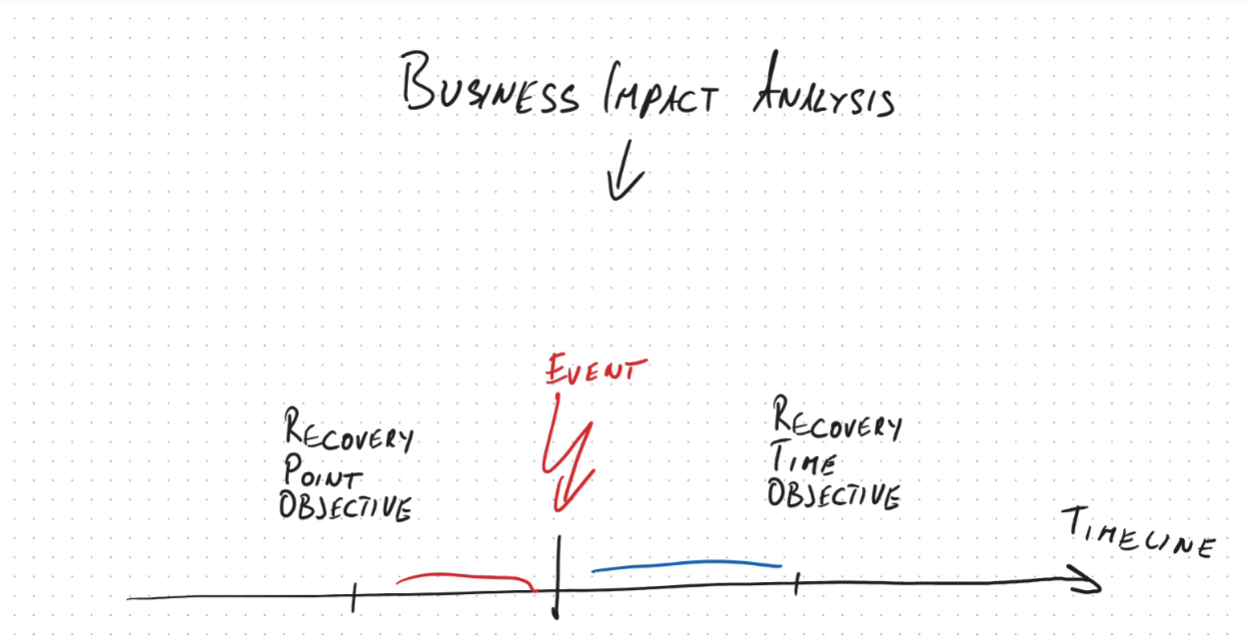
Modern ransomware attacks involve both encryption and data exfiltration/extortion. Defense: Immutable backups, data classification, encryption, and incident response planning. Business continuity: Recovery Point Objective (RPO) and Recovery Time Objective (RTO) are key metrics.
Day 2
Tools for compliance management
- Microsoft Purview (for M365)
- Defender for Cloud (for Azure infrastructure), and their respective portals. Azure Policy and Initiatives were explained as mechanisms for enforcing technical controls and regulatory standards.
Azure Architecture & Management
Structure and relationships between tenants, subscriptions, management groups, and resource groups were clarified. Role-based access control (RBAC) and policy assignment strategies were discussed for scalable management and security. Azure Lighthouse was mentioned for cross-tenant management, especially in scenarios involving mergers and acquisitions.
Identity & Access Management
PIM
Microsoft Entra Privileged Identity Management (PIM) enables just-in-time and approval based access to privileged roles.
Synchronization options:
- Password Hash Sync (PHS)
- Pass-Through Authentication (PTA)
- Federation (ADFS), with pros, cons, and failover considerations.
External user management: B2B collaboration, guest/member distinctions, and new Entra External ID for B2C scenarios. Conditional Access policies, user/sign-in risk, and mitigation strategies (MFA, password change) were covered. Detailed privileged identity management (PIM), including eligible vs. active roles, time-bombed access, and access reviews. Discussed break-glass accounts, tiered access models (Tier 0/1/2), and the evolution to the enterprise access model. Managed identities, workload identity federation, and secure application authentication patterns.
Security Operations & Monitoring
Defender for Identity, Entra ID Protection, and Defender for Endpoint were introduced for threat detection, lateral movement analysis, and endpoint security.
- Sentinel and Defender XDR were discussed as SIEM/SOAR solutions for centralized threat detection and incident response.
Case study
Case study Identity and data security
Day 3
SOC Operations & Security Monitoring
Outlined SOC design, including tiered response (triage, investigation, hunting/communication). Introduced key metrics: Mean Time to Acknowledge (MTTA) and Mean Time to Recover (MTTR).
Discussed integration of Sentinel and Defender XDR, transition to the Defender portal, and the use of Security Copilot for incident investigation and reporting. Highlighted the importance of collecting relevant logs, tuning monitoring tools, and avoiding overcollection.
Application Security & Threat Modeling
Secure Development Lifecycle (SDL) and Secure Future Initiative. Emphasized threat modeling using STRIDE, OWASP, and deprecated DREAD models. Microsoft Threat Modeling Tool and the importance of identifying and mitigating vulnerabilities.
Discussed static vs. dynamic application security testing, dependency management, and penetration testing (including Azure-specific rules of engagement).
Data Security & Encryption
Explained data protection in three states: at rest, in transit, and in use. Covered encryption options for VMs (BitLocker, dm-crypt, FileVault), Azure Disk Encryption, and encryption at host. Detailed SQL Server protections: TLS for data in transit, Transparent Data Encryption (TDE) for data at rest, Always Encrypted for data in use, and dynamic data masking. Clarified Azure Storage encryption: customer-managed keys, customer-provided keys, and their application to BLOB storage and files.
Cloud Security Products & Solutions
Reviewed Azure Backup, Azure Arc, Azure Policy, Defender for Cloud, Sentinel, Defender XDR, Security Copilot, Entra lifecycle management, and entitlement management. Discussed the use of Global Secure Access (GSA) as a VPN replacement, application proxy, and conditional access for granular policy enforcement. Highlighted the importance of compliance frameworks (HIPAA, HITRUST) and governance for healthcare and regulated industries.
Case study
Case study Identity and data security
Day 4
Network security groups (NSG)
Are on Layer 3/4 (TCP IP layer) and can control 5 things:
- Source IP
- Destination IP
- Source Port
- Destination Port
- Protocol (TCP, UDP, ICMP)
Application Security Group (ASG)
Case study 1
Case study 2
Securing endpoint and infrastructure
Connect private network from different locations
To connect different networks privately over internet (on-prem, AWS, Azure) you should use VPN Gateway or SD-WAN.
SD-WAN
Software defined wide area network. In the past, it was about connecting branches to headquarter. But now with cloud, its more about connecting branches to cloud providers (Azure, AWS etc.) It is more flexible and cheaper than MPLS and apparently replaces it.
Other kids on the block
MPLS (Multiprotocol Label Switching)
Uses labels for routing instead of IP addresses. This makes it fast. Useful for real-time applications like VoIP and video conferencing. Used to connect branch offices. Its expensive and inflexible.
DMVPN
Dynamic multipoint virtual private network. Uses IpSec encryption Starts with Hub and spoke model. Used to connect office branches to central headquarter.
iWAN
intelligent WAN, fancy DMVPN.
SDN
Software defined networking. SDN Controller tells network devices how to route traffic via software. No more manual configuration of routers/switches etc.
Overview network and security tools
Azure Backup
Creates immutable backups to protect against ransomware.
Microsoft security copilot
Ai based tool to help security analysts (SOC) to investigate incidents and generate reports
Microsoft Entra
Microsoft Entra Identity Protection
Uses risk-base policies to minimize anomalous behaviour, identify compromised credentials and dangerous logins Can react dynamically based on user risk level and sign-in risk level.
Microsoft Entra Conditional access
Can enforce policies based on user, location, device state, app sensitivity and risk level. For cloud and hybrid environments. Can use Intune device compliance states like non-compliant or high-risk devices to restrict access.
Self-service Password reset (SSPR)
Allows users to reset their password without helpdesk intervention. To prevents account lockouts.
Entra ID Lifecycle Workflow
Automates user lifecycle management via workflows, like onboarding, offboarding, role changes and approval flows.
Entra Entitlement Management
Standardizes access request, approval, review and expiration for internal and external users. Provides access packages for groups of resources. Auto expiry, recurring access reviews etc.
Entra application proxy
Provides secure remote access to on-prem web apps. Works with conditional access policies. Enables SSO and MFA for on-prem apps.
Entra private access
Provides secure remote access to internal apps without VPN.
Entra public access
Provides secure access to public apps (SaaS) via conditional access policies.
Azure SQL Db - Always Encrypted
It protects sensitive data inside a database. Data is encrypted on client side and never appears as plaintext in the database system. Data is decrypted only on client side, therefore the DBA or sysadmin cannot see the data and also join, filter and sort operations are not possible on encrypted columns.
Always Encrypted with secure enclaves
It enables in-place encryption, decryption, and processing of sensitive data inside a secure enclave (protected area in memory) in the SQL server process. This (SQL server 2022+) allows filtering, joining, sorting and grouping on encrypted columns.
Azure Application Gateway
Used for routing and managing http/https traffic to web apps.
Purview
Information protection in M365 to label information based on sensitivity.
Purview Data Loss Prevention (DLP)
It detects sensitive information in M365 (emails, documents) and prevents data leaks via policies. Warns or blocks users from sharing sensitive information externally.
Purview eDiscovery
Focuses on legal investigations.
MS Intune
Centralizes device management for mobile devices and computers.
Azure Arc
Agent to install on non-azure resources like on-prem servers or other cloud providers to manage them via azure portal. It enables centralized visibility and compliance enforcement for Kubernetes (apply policies across EKS and AKS.) ARM (azure resource manager) can be used to deploy configurations to Arc-enabled servers and kubernetes clusters. Azure Arc can enable Azure policy and Defender for Containers on EKS. Azure Arc is used to configure workload identity federation for EKS clusters for access Azure SQL DB, cosmos DB, Azure key vaults etc. via Entry ID.
Is used with Guest configuration to enforce security baselines (password policies, firewall, autdit settings on OS level) on VMs (on-prem or other clouds)
Azure Arc can be used to configure admission controllers for EKS/AKS clusters.
Azure Policy
It automates compliance enforcement for Kubernetes deployments across EKS and AKS clusters. Preventing misconfiguration via Azure Arc. Supports regulations like HIPAA and HITRUST and can apply policies to azure resources and via Azure Arc to non-azure resources.
Azure lighthouse
Provide access to a subscription over different tenants.
Azure ioT Edge
private link
Azure IoT Hub
Microsoft Sentinel
It is the SIEM/SOAR solution from microsoft.
MS Sentinel integrates with:
- Microsoft Defender XDR
- Defender for Cloud
- Defender for Cloud apps
- Defender for containers (EKS/AKS)
- Defender for IoT
Allows automated remediation via playbooks and integrated ticketing systems. (alerting) It also integrates with Microsoft security copilot for ai based incident investigation and report generation.
Microsoft Sentinel can also aggregate logs from regional SIEMs.
Azure Container registry (ACR) Tasks
Automate container image builds and patching.
Azure container instances (ACI)
Runs containers without managing servers. Doesnt provide vulnerability scanning or automated updates of open-source dependencies or base images.
Microsoft Defender family
Microsoft Defender XDR
It is the extended detection and response platform. Provides unified investigation across endpoints, IoT, email and cloud apps. It correlates signals across endpoints email, identities and cloud apps to detect sophisticated attacks.
Microsoft Defender for Endpoint
It protects end-user devices and servers from malware, ransomware. It surfaces vulnerabilities in Intune managed devices and can automate response and remediation.
You can deploy this agent on all Intune managed devices via Intune app deployment policies.
Has advanced features like Automated investigation and remediation (AIR) and Endpoint detection and response (EDR). This features can run in block mode to stop malicious activities automatically.
Microsoft Defender for cloud
Can display dashboard for compliance posture.
Azure Defender for Cloud Apps
It secures cloud apps after deployment. Extends visibility to cloud app permissions and Oauth tokens, detecting excessive or risky permissions.
Azure Defender for Cloud DevOps security
Complements Azure Policy by helping to enforce security earlier in the development lifecycle. Provides automated scanning for vulnerabilities and misconfiguration in code, IaC and containers in CI/CD pipelines.
Microsoft Defender for Containers - AKS/EKS
It provides runtime protection and vulnerability management for container workloads running in AKS or EKS clusters.
Microsoft Defender for Identities
Correlates signals from AD and Entra ID, analyzes attack timelines and lateral movement paths. Can identify credential theft and lateral movement based on domain controllers logs from AD.
Workload identity for EKS/AKS
Workloads identity enable pods to authenticate with short-lived tokens. They integrate with Entra ID for AKS, IAM roles for EKS and extend Entra ID to EKS via Azure Arc. In AKS its called Workload identities In EKS its called IAM roles for service accounts (IRSA)
Azure VPN Gateway
Enable secure IPsec tunnel between on-premises, AWS EKS and Azure networks.
Certificate SC-100
Go truth this: https://learn.microsoft.com/en-us/training/courses/sc-100t00?wt.mc_id=esi_m2l_content_wwl#study-guide
Watch this: https://learn.microsoft.com/de-de/shows/exam-readiness-zone/preparing-for-sc-100-design-solutions-that-align-with-security-best-practices-and-priorities
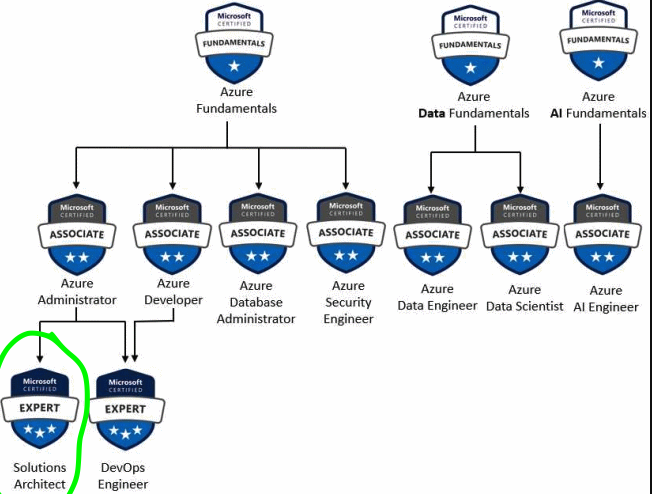
- Taking Sc-100 doesn’t give you the three star badge automatically.
-
You need to pass also AZ-500, SC-200, SC-300
- Design solution with guidance of CAF (Cloud Adoption Framework)
- Design solution with guidance of WAF (Well-Architected Framework)
- Design solution with guidance of MCRA (Microsoft Cybersecurity Reference Architecture)
- Design solution with guidance of MCSB (Microsoft Cloud Security Benchmark)
Read this: https://learn.microsoft.com/en-us/credentials/certifications/resources/study-guides/sc-100?source=docs Train this: https://learn.microsoft.com/en-us/credentials/certifications/exams/sc-100/practice/assessment?assessment-type=practice&assessmentId=87
Register here: https://learn.microsoft.com/de-de/credentials/certifications/exams/sc-100/
